ip
Pixel User Guide
Introduction
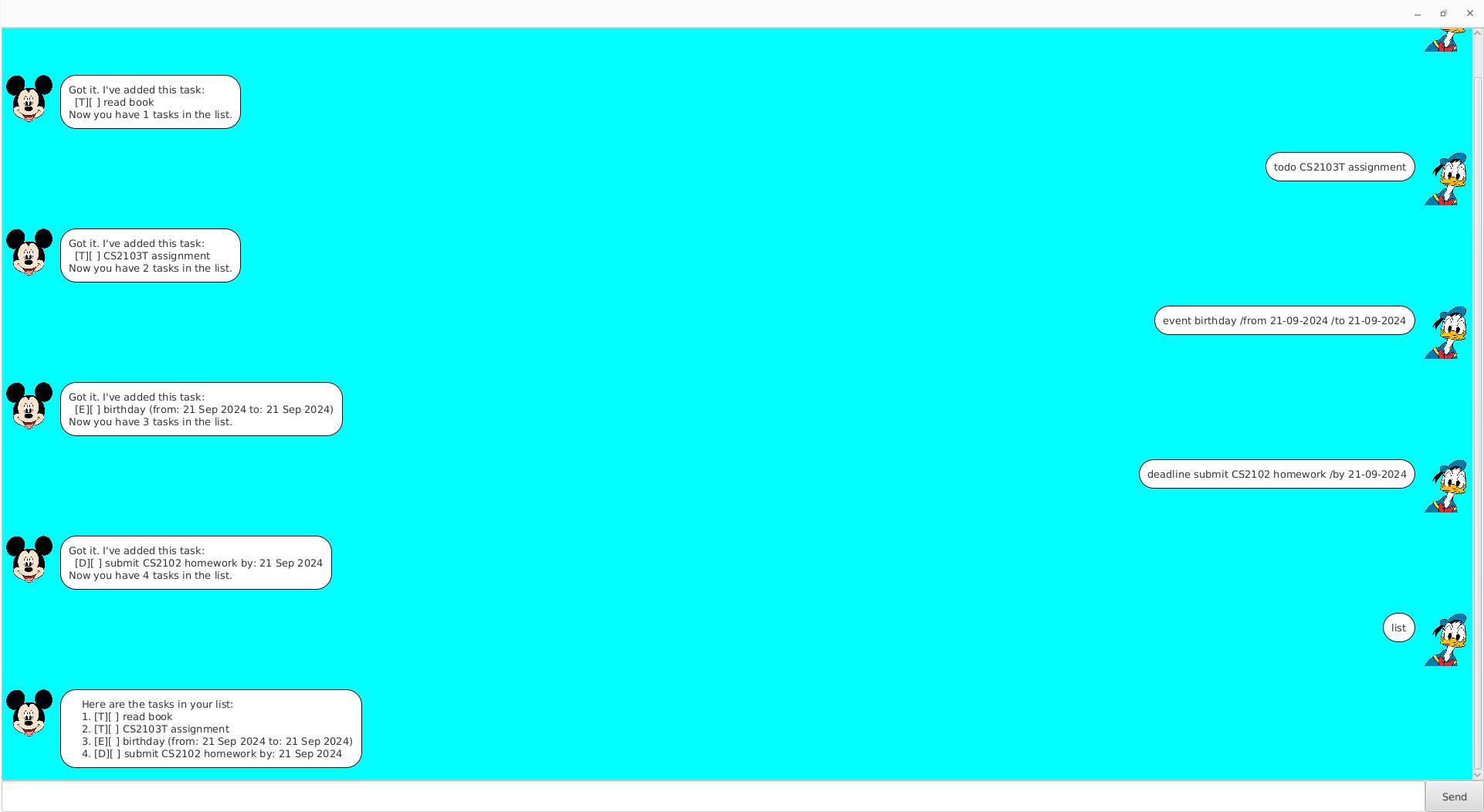
Pixel is a simple text-based task management application that assists you in tracking your todos, deadlines and events. Pixel allows you to add, delete, find, sort and list tasks, making it easier to stay organised.
Features
1. Adding Tasks
Pixel allows you to add 3 different types of tasks:
- Todo: A task without a specific date
- Deadline: A task with a specific deadline
- Event: A task that has a start date and end date
1.1 Adding a Todo
To add a todo task:
todo <task_description>
Example:
todo read book
Expected Outcome:
Got it. I've added this task:
  [T][ ] read book
Now you have 1 tasks in the list.
1.2 Adding a Deadline
To add a deadline task:
deadline <task_description> /by <date>
Example:
deadline submit homework /by 20-09-2024
Expected Outcome:
Got it. I've added this task:
  [D][ ] submit homework by: 20 Sep 2024
Now you have 2 tasks in the list.
1.3 Adding an Event
To add an event task:
event <task_description> /from <date> /to <date>
Example:
event overseas trip /from 21-09-2024 /to 28-09-2024
Expected Outcome:
Got it. I've added this task:
  [E][ ] overseas trip (from: 21 Sep 2024 to: 28 Sep 2024)
Now you have 3 tasks in the list.
2. Listing Tasks
To show all tasks in your list:
list
Expected Outcome:
    Here are the tasks in your list:
    1. [T][ ] read book
    2. [D][ ] submit homework by: 20 Sep 2024
    3. [E][ ] overseas trip (from: 21 Sep 2024 to: 28 Sep 2024)
3. Mark Tasks as Done
To mark a task as done:
mark <task_number>
Example:
mark 1
Expected Outcome:
Nice! I've marked this task as done:
 [T][X] read book
4. Unmark Tasks as Not Done
To unmark a task:
mark <task_number>
Example:
unmark 1
Expected Outcome:
OK, I've marked this task as not done yet:
 [T][ ] read book
5. Delete Task
To delete a task:
delete <task_number>
Example:
delete 1
Expected Outcome:
Noted. I've removed this task:
  [T][ ] read book
Now you have 2 tasks in the list.
6. Find Task using keyword
To find tasks that contain a specific keyword:
find <keyword>
Example:
find homework
Expected Outcome:
Here are the matching tasks in your list:
1. [D][ ] submit homework by: 20 Sep 2024
Expected Outcome:
Here are the matching tasks in your list:
1. [D][ ] submit homework by: 20 Sep 2024
deadline submit CS2101 homework /by 22-09-2024
7. Sort Deadline by date from earliest to latest
To sort deadline:
sort deadline
Example:
Suppose there were no tasks. Add the following one at a time:
deadline submit CS2101 homework /by 22-09-2024
deadline submit CS2102 homework /by 21-09-2024
deadline submit CS2103T homework /by 23-09-2024
Listing out using list will give this order:
    Here are the tasks in your list:
    1. [D][ ] submit CS2101 homework by: 22 Sep 2024
    2. [D][ ] submit CS2102 homework by: 21 Sep 2024
    3. [D][ ] submit CS2103T homework by: 23 Sep 2024
After sorting using sort deadline:
    Here are the tasks in your list:
    1. [D][ ] submit CS2102 homework by: 21 Sep 2024
    2. [D][ ] submit CS2101 homework by: 22 Sep 2024
    3. [D][ ] submit CS2103T homework by: 23 Sep 2024
8. Sort Event by start date from earliest to latest
To sort deadline:
sort deadline
Example:
Add the following one at a time:
event overseas trip /from 27-09-2024 /to 02-10-2024
event overseas trip /from 22-09-2024 /to 25-09-2024
event overseas trip /from 23-10-2024 /to 01-11-2024
Listing out using list will give this order:
Here are the tasks in your list:
    1. [D][ ] submit CS2102 homework by: 21 Sep 2024
    2. [D][ ] submit CS2101 homework by: 22 Sep 2024
    3. [D][ ] submit CS2103T homework by: 23 Sep 2024
    4. [E][ ] overseas trip (from: 27 Sep 2024 to: 02 Oct 2024)
    5. [E][ ] overseas trip (from: 22 Sep 2024 to: 25 Sep 2024)
    6. [E][ ] overseas trip (from: 23 Oct 2024 to: 01 Nov 2024)
After sorting using sort event:
    Here are the tasks in your list:
    1. [E][ ] overseas trip (from: 22 Sep 2024 to: 25 Sep 2024)
    2. [E][ ] overseas trip (from: 27 Sep 2024 to: 02 Oct 2024)
    3. [E][ ] overseas trip (from: 23 Oct 2024 to: 01 Nov 2024)
    4. [D][ ] submit CS2101 homework by: 22 Sep 2024
    5. [D][ ] submit CS2102 homework by: 21 Sep 2024
    6. [D][ ] submit CS2103T homework by: 23 Sep 2024